

Integración con Cisco Umbrella
Conecte Cisco Umbrella para que SecureAI pueda detectar qué fuentes corporativas están resolviendo dominios LLM/AI, utilizando Reporting API v2 de Umbrella. Umbrella es una fuente de capa DNS: confirma que un dispositivo resolvió un dominio de IA (no la carga útil TLS completa), que es exactamente lo que necesita el descubrimiento de IA en la sombra. SecureAI ejecuta dos pases para una cobertura máxima:- Una lista seleccionada de dominios LLM/AI conocidos.
- La categoría de contenido
212de Umbrella (“IA generativa”), por lo que los servicios de IA recientemente populares se detectan incluso antes de que estén en la lista seleccionada.
Requisitos previos
- Un paquete general que incluye API de informes y registros de actividad de DNS.
- Credenciales API de Umbrella (clave API + secreto) y su ID de organización.
- Para usar acciones de respuesta desde SecureAI, permisos adicionales de Policies / Destination Lists.
Credenciales requeridas
Permisos según la capacidad
Para habilitar todas las funciones (discovery completo, categorías y ambos tipos de bloqueo) con la Key Scope de Umbrella, seleccione exactamente:
Dónde conseguirlos
- Inicie sesión en el panel de Umbrella.
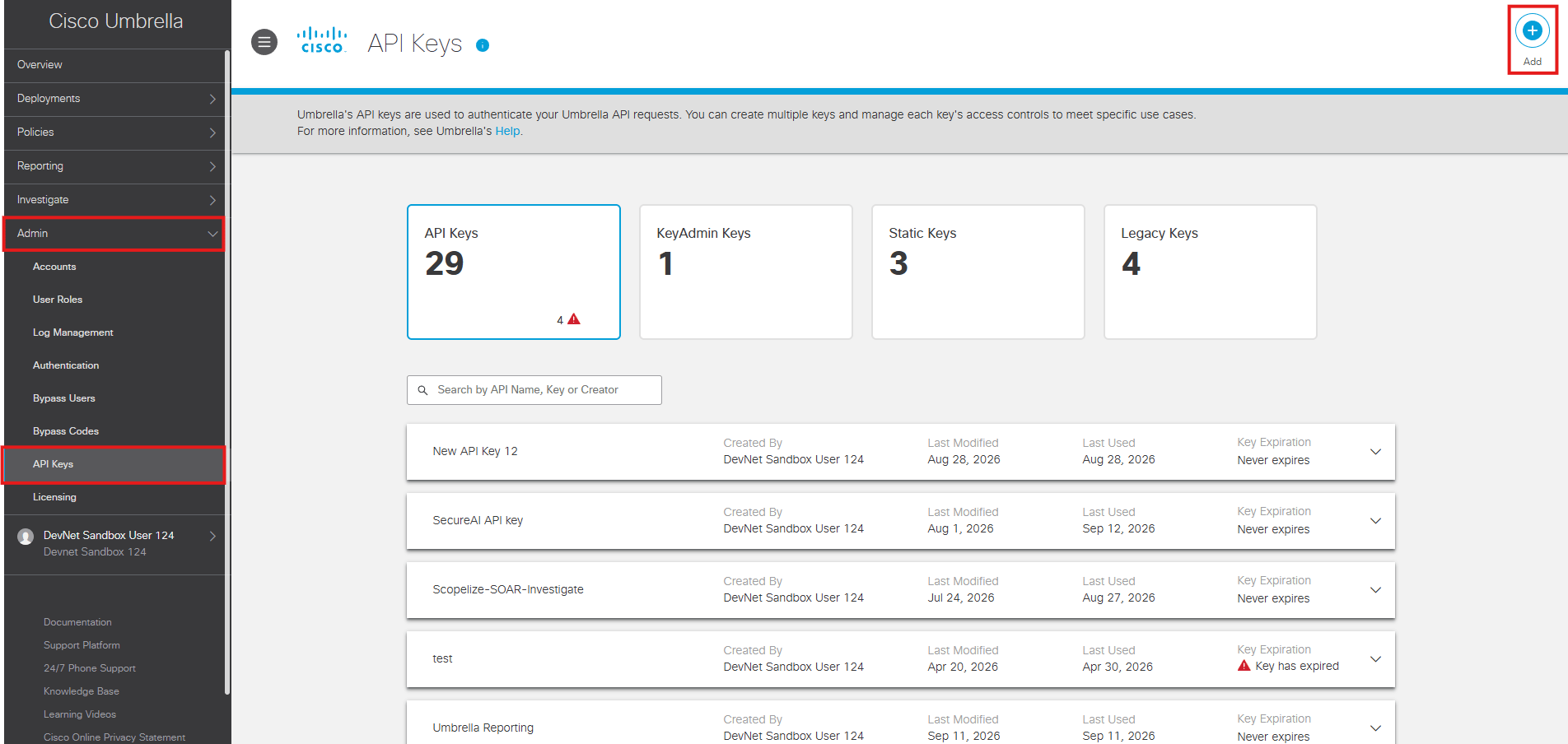
- Vaya a Administrador → Claves API y haga clic en Add, en la esquina superior derecha.
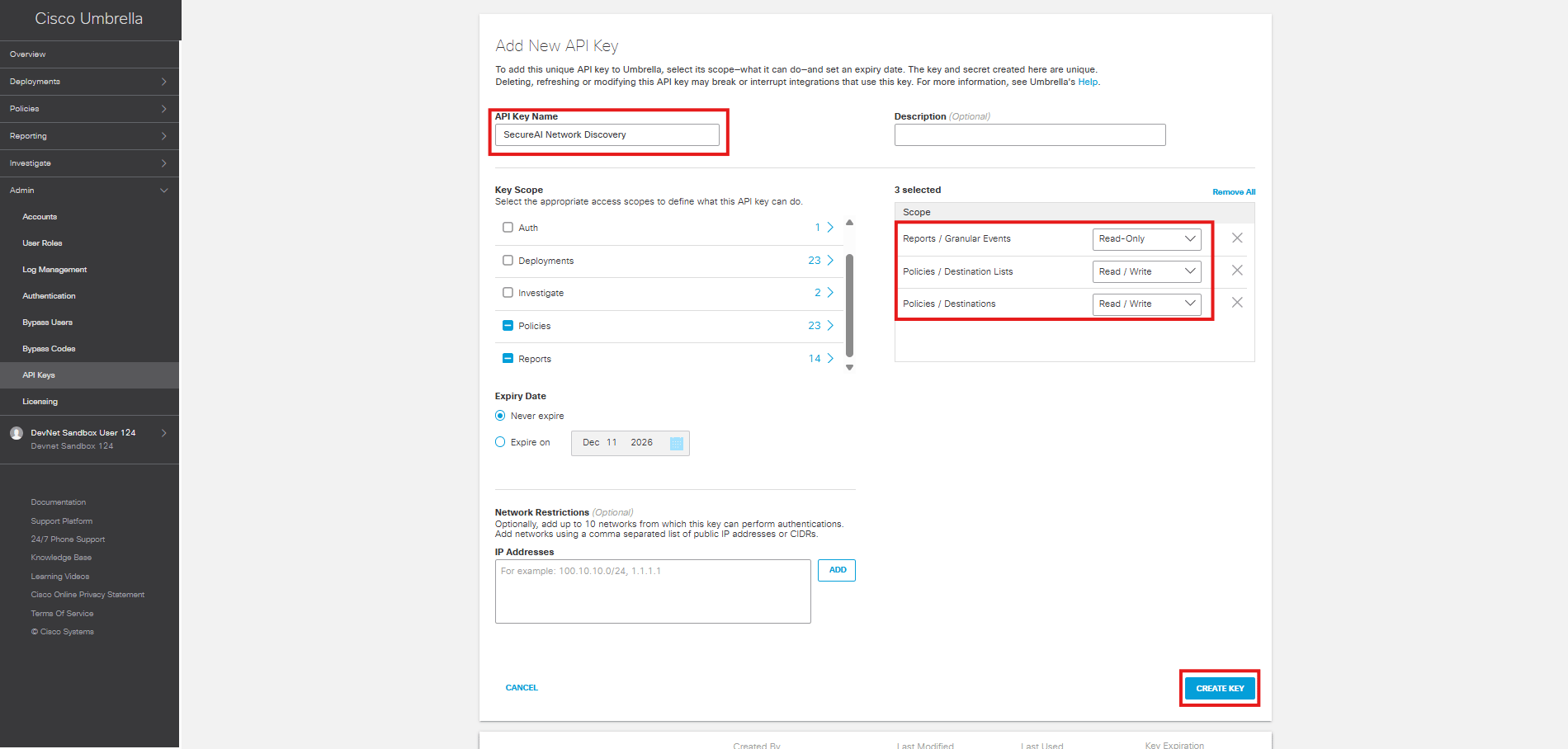
- Dentro de Add New API Key, ingrese un nombre para la API Key.
- En Key Scope, seleccione Reports → Granular Events. En el panel de la derecha, confirme que aparezca Reports / Granular Events → Read-Only.
- Si SecureAI va a ejecutar acciones de respuesta, agregue Policies → Destination Lists y Policies → Destinations, ambos en modo Read / Write.
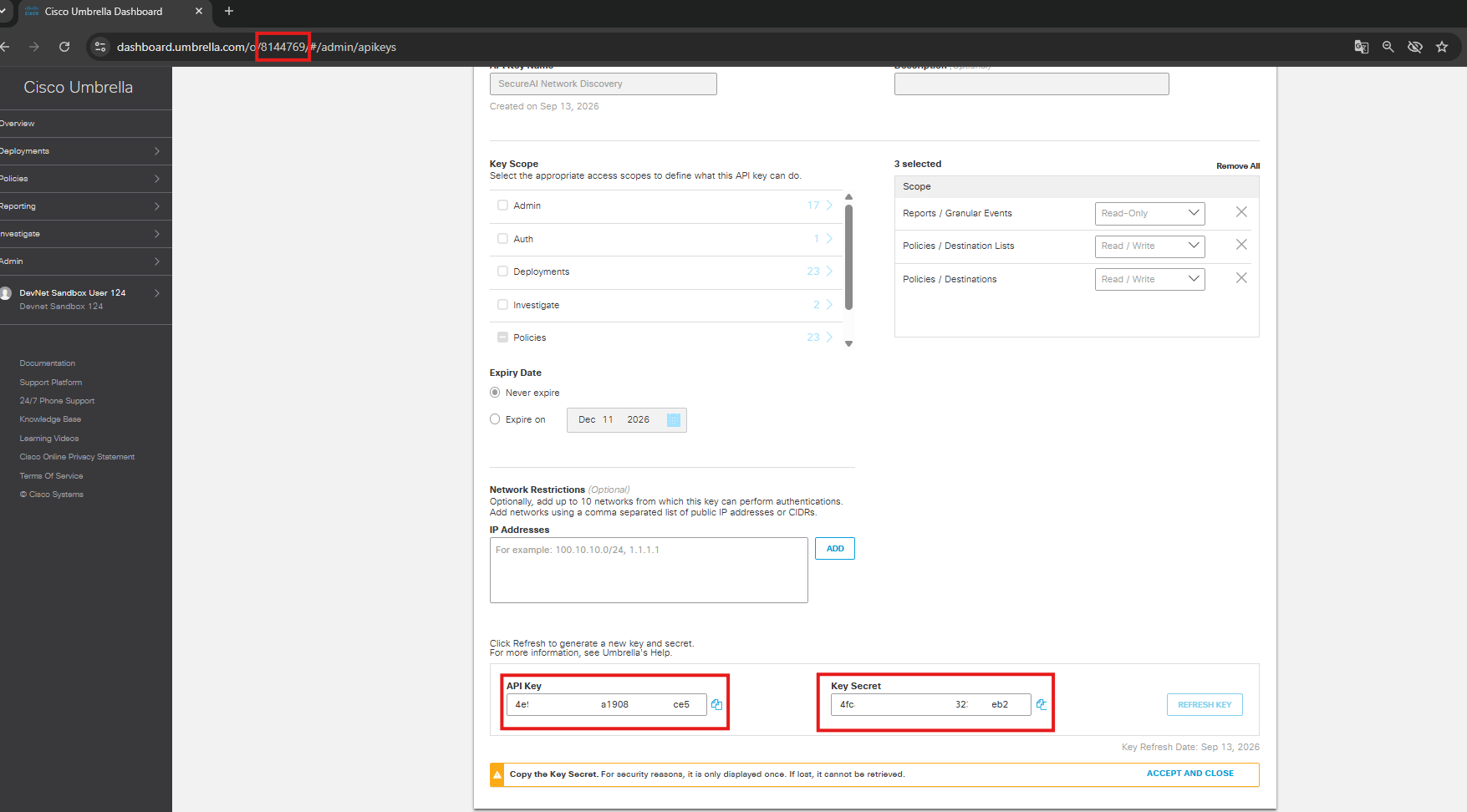
- Copie la API Key y el Key Secret inmediatamente. Cisco Umbrella muestra el secreto una sola vez.
- Identifique el Organization ID en la URL del panel, en una ruta similar a
.../o/<orgId>/#/....
Antes de publicar una captura de esta pantalla, cubra completamente la API Key y el Key Secret. Nunca incluya credenciales reales en la documentación.
POST https://api.umbrella.com/auth/v2/token (Básico apiKey:apiSecret, client_credentials) y lee GET /reports/v2/activity/dns.
Configurar en SecureAI
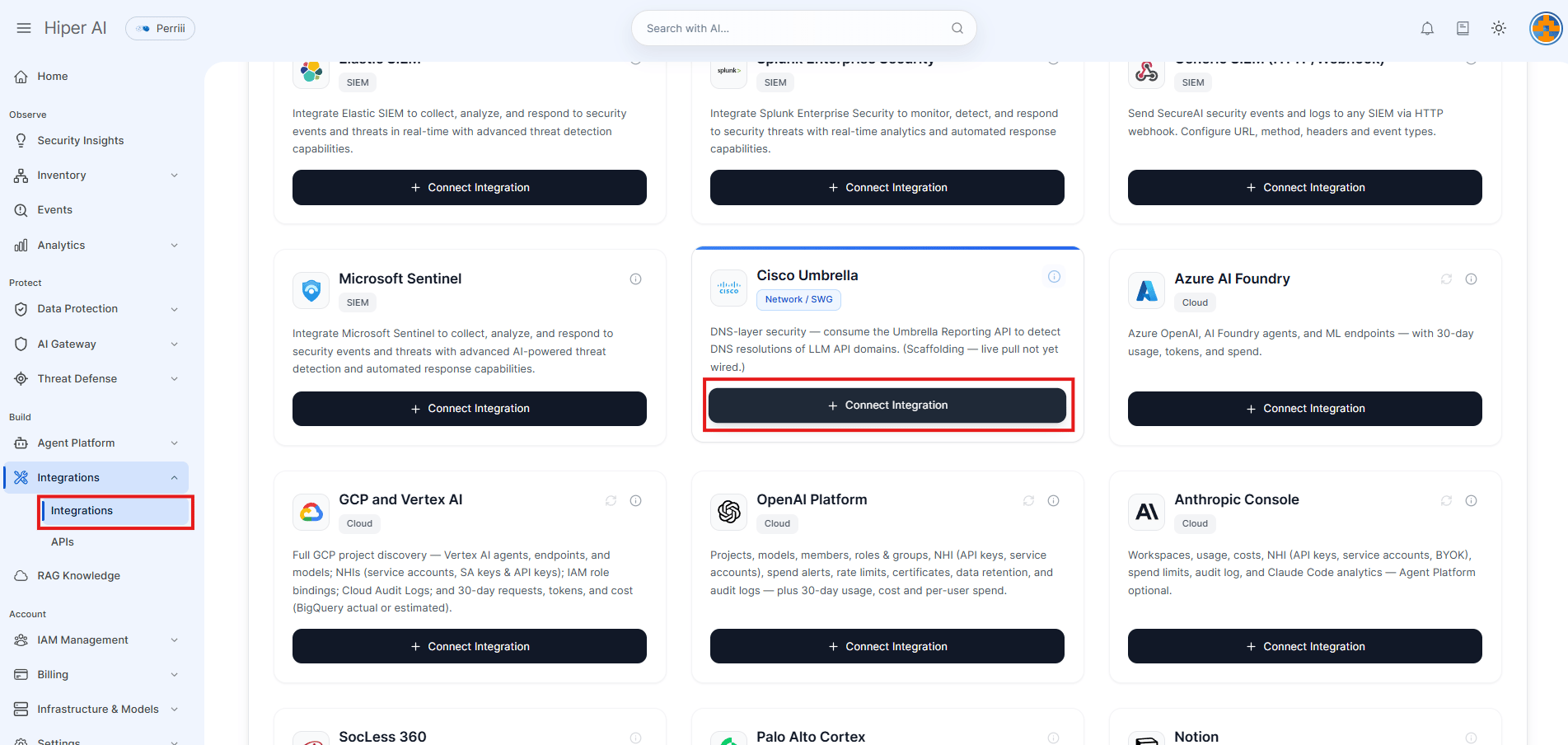
- En SecureAI, abra Administrador → Integraciones.
- Seleccione la categoría Red.
- En la tarjeta Cisco Umbrella, haga clic en Conectar.
- Complete los tres campos del formulario:
- Umbrella API Key
- Umbrella API Secret
- Organization ID
Para esta captura, cubra la API Key, el API Secret y cualquier otro identificador sensible antes de publicarla.
- Haga clic en Connect. SecureAI guarda las credenciales y muestra la integración como configurada.
El formulario de Integraciones no muestra un botón separado de prueba para Cisco Umbrella. La validación y la primera lectura se realizan durante la sincronización.
Acciones de respuesta y bloqueos
SecureAI usa la Policies API v2 para las acciones de respuesta que agregan dominios de IA a una destination list de bloqueo y los retiran cuando la acción vence o se libera. La integración es de capa DNS y el bloqueo se aplica por dominio. El alcance depende de las policies de Umbrella a las que esté asociada la destination list. La lista administrada por SecureAI no bloquea tráfico por sí sola: un administrador debe asociarla a una policy en el dashboard de Umbrella. Si la API key solo tiene permisos de Reporting, el descubrimiento seguirá funcionando, pero las acciones de bloqueo devolverán un error de permisos. No es necesario agregar una segunda credencial en el formulario actual: SecureAI reutiliza la API key y el secreto configurados para Umbrella.Iniciar la sincronización
- En la tarjeta configurada de Cisco Umbrella, haga clic en el botón de sincronización (icono de flechas circulares).
- Espere a que termine la sincronización inicial. Esta operación ejecuta un relleno de actividad DNS en segundo plano.
- Para sincronizaciones posteriores, repita la acción cuando necesite actualizar los datos manualmente. El proceso programado también mantiene actualizado el inventario.
Notas
- Umbrella es capa DNS: una coincidencia confirma la resolución del dominio, no una llamada API completa. Es ideal para su amplitud (todos los dispositivos detrás de Umbrella) pero no lleva cargas útiles de solicitud.
- Si la salida de Umbrella debe pasar por un proxy, configure
UMBRELLA_PROXY_URL(o el estándarHTTPS_PROXY) en el backend de SecureAI.
Verificar el resultado
Después de la primera sincronización, abra Fuentes de red: las fuentes que resolvieron dominios de IA aparecen con sus proveedores, recuento de llamadas y gravedad. Si la sincronización falla, revise el estado y el mensaje de error de la tarjeta Cisco Umbrella, confirme que la clave tenga permisos de Informes y verifique que el backend pueda realizar conexiones salientes aapi.umbrella.com.