

How it works
- The router sends one syslog line for every DNS query it gets from a client, IPv4 or IPv6
(
query from 10.20.3.100: #5 chatgpt.com. A). - The SecureAI collector, a container that runs in your network, keeps the queries to AI services and sends them to SecureAI. The rest of the browsing never leaves your network.
- Network Sources shows the IP of each device and the AI providers it looked up.
- When you prohibit a provider, a router script downloads the SecureAI block list every 5 minutes and creates one
DNS entry per domain. A client that asks for
chatgpt.comorab.chatgpt.comgets NXDOMAIN.
What SecureAI sees and what it does not
- The domain looked up and the client IP, IPv4 or IPv6. No URLs, paths or content.
- The user and the device, if the router runs a Hotspot or hands out IPs over DHCP: the collector adds to each query who held that IP at that moment (section 7). Without Hotspot or DHCP, the query arrives without a user.
- A query is not a connection. Browsers look up names they may not use, and the device’s cache skips queries for names they do use. The count is approximate.
- If the router answered the query with NXDOMAIN (a domain on the block list), SecureAI counts it as blocked. An AI name that does not exist counts as blocked too. In address-list mode the router resolves the name and drops the connection afterwards: those queries do not show as blocked.
Requirements
- A MikroTik with RouterOS 7.18 or later (see Versions).
- A router user with the
read,write,testandftppolicies. - Clients that get the router as their DNS server (through DHCP, the usual setup), and a router that answers LAN
queries:
/ip dns set allow-remote-requests=yes. The default configuration drops queries that arrive on the WAN; if you changed it, make sure port 53 is not open to the internet. - A Linux machine with Docker in your network for the collector. The router must reach it over syslog, and it must reach your tenant over HTTPS.
- A router that reaches your SecureAI tenant over HTTPS to read the block list.
1. Connect the router and install the collector
- Open Admin → Integrations and pick the Network / SWG category.
-
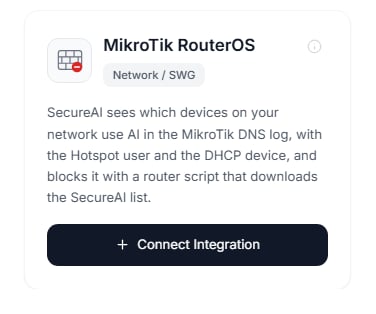
On the MikroTik RouterOS card, click Connect.
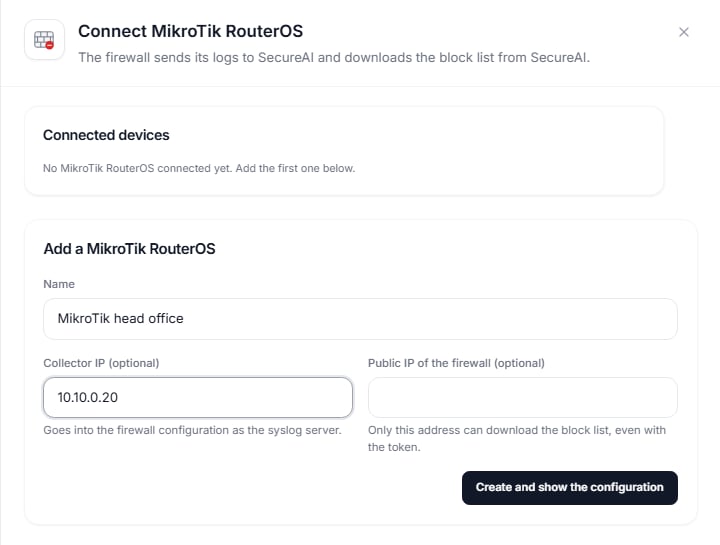
- Fill in the name, the collector IP (the Linux machine) and, if you want, the router’s public IP: SecureAI then refuses anyone else who asks for the block list, even with the token.
-
Create and show the configuration asks for your second factor and creates the log source for the
mikrotik-routerosconnector and the block feed in theplainformat.
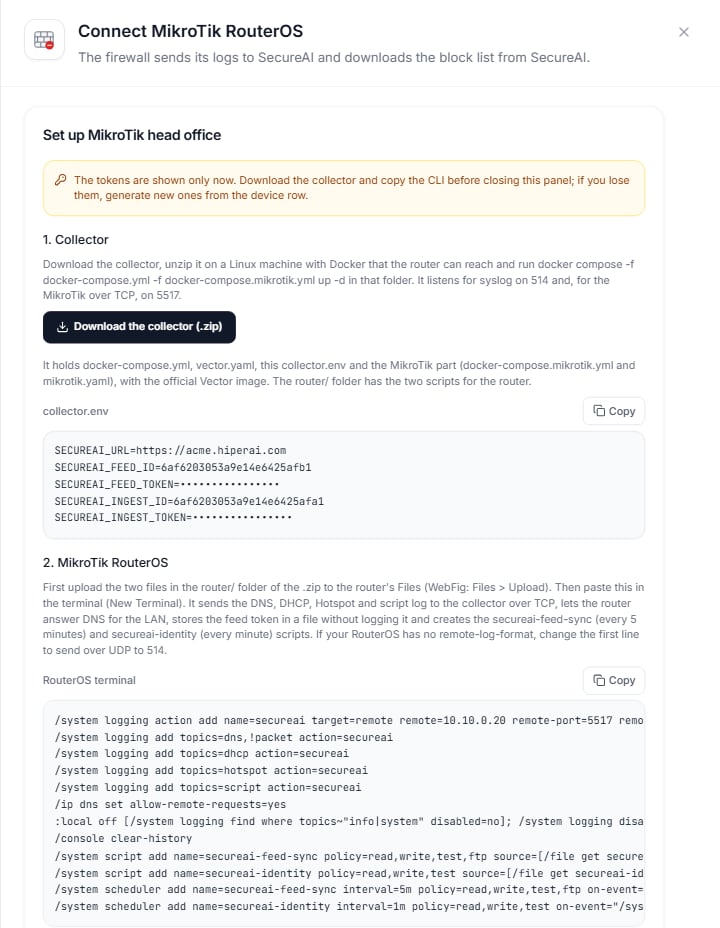
Install the collector
In the same panel, Download the collector (.zip). The package holds the collector configuration with this device’s values and, inrouter/, the two scripts for the router. It runs on the official Vector image. On the Linux
machine, inside the package folder:
router/ to the router’s Files and paste those lines into the terminal. The next steps
explain what each one does.
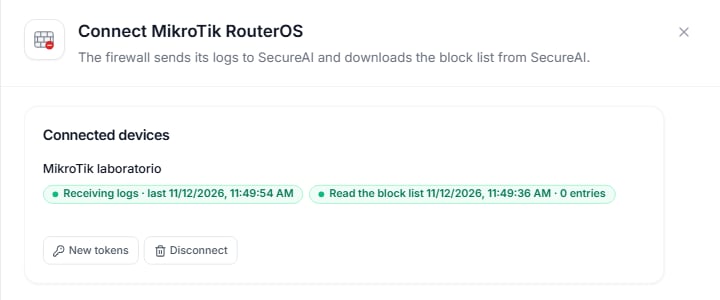
Once the router sends its log and has read the list, the device row shows both states in green:
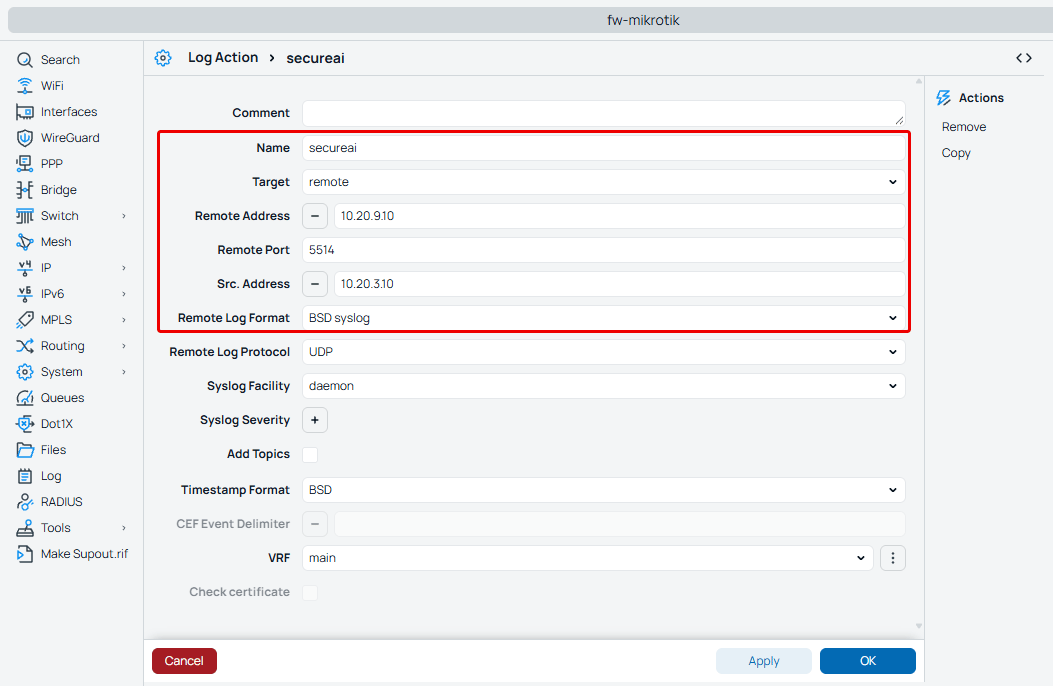
2. Send the router’s DNS log to the collector
In the router terminal (WebFig or Winbox: New Terminal):dhcp, hotspot and script
are for the user and the device (section 7). !packet leaves out the dump of each DNS packet,
which takes several lines per query.
RouterOS adds remote-protocol and remote-log-format in 7.18. On 7.15 to 7.17 the action goes without both and
with remote-port=514: the router sends over UDP, each message in its own packet, and a lost packet is not sent
again. That path is not tested.
3. Block with the SecureAI script
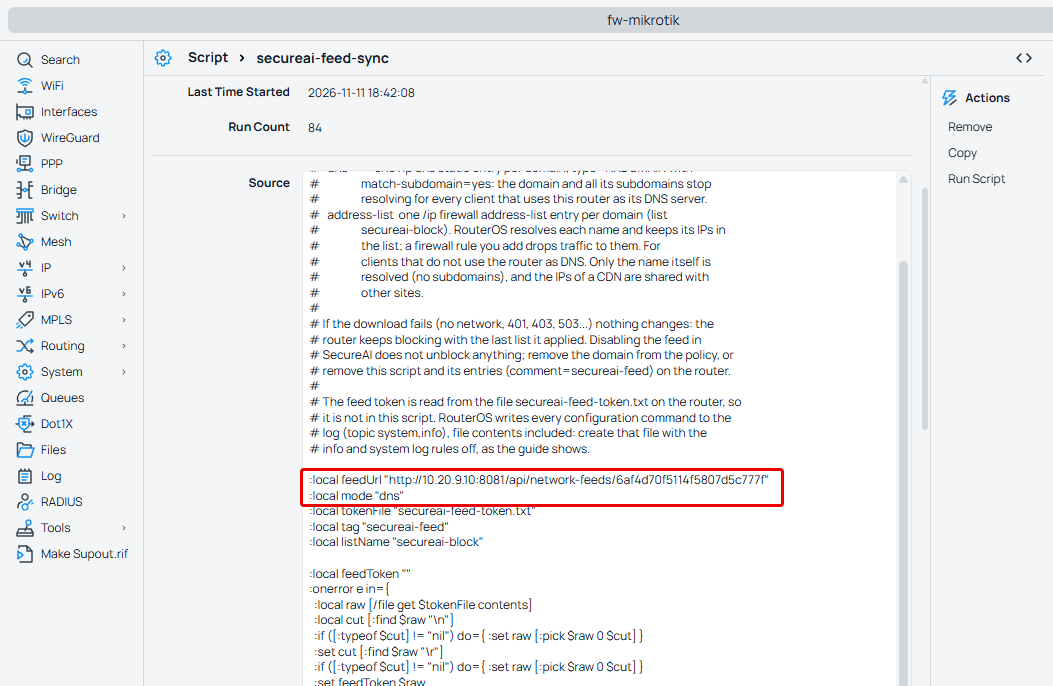
Thesecureai-feed-sync script runs every 5 minutes. Each run:
- reads the feed token from the
secureai-feed-token.txtfile on the router; - downloads the list with
Authorization: Bearer <token>and validates the TLS connection (expiry, name and issuer) against the CAs that ship with RouterOS; - creates one
/ip dns staticentry per domain, of type NXDOMAIN withmatch-subdomain=yes, and removes the ones no longer in the list. All of them carrycomment=secureai-feed.
secureai: feed download failed (...).
3.1 Store the token without logging it
RouterOS logs every configuration command with its values. This command turns off theinfo and system log rules,
creates the token file and turns them back on, in a single line:
/console clear-history. That command needs an
administrator: a user with only the read, write, test and ftp policies gets a permissions error.
With New tokens, on the device row, the panel shows the new collector.env and, for the router, only this line
and /console clear-history. Replace collector.env and run the collector’s docker compose again: the router
reconnects on its own in about 3 minutes, and the queries it logs in between are lost.
3.2 Create the script and the scheduler
In WebFig, System > Scripts > Add New:
The script holds no secrets: the token is in the file from the previous step.
secureai-feed-sync script
secureai-feed-sync script
4. Clients with another DNS server
A device with another DNS server set by hand (8.8.8.8, for example) does not ask the router: it does not show up in
SecureAI and is not blocked. These rules send every DNS query that leaves the LAN to the router, whatever server it
was meant for:
LAN is the interface list of the default configuration. If your router does not have it, use in-interface= with
the LAN interface or bridge. The device believes 8.8.8.8 answers, but the answer comes from the router.
For IPv6, the same rules go in /ipv6 firewall nat. We have not tested that variant yet.
5. DNS over HTTPS
Browsers and operating systems can resolve over DNS over HTTPS (DoH): the query travels encrypted to a public resolver and the router never sees it. With:local blockDoh "yes" in the script, each run:
- adds the known public DoH resolvers (
dns.google,cloudflare-dns.com,quad9.netand others) to the block list, plus two canaries:use-application-dns.net, which makes Firefox turn off its default DoH, andmask.icloud.com, which makes Apple devices turn off iCloud Private Relay; - fills the
secureai-dohlists (/ipand/ipv6 firewall address-list) with their addresses, because some systems reach a known resolver by IP, with no name to block.
DnsOverHttpsMode=off in Chrome and Edge) is still the
firmest option. If you set it back to "no", the next run removes what it had added.
6. Address-list mode
For devices that do not go through the router’s DNS even with the redirect, the script can block by IP: with:local mode "address-list" it creates one entry per domain in the secureai-block list, RouterOS resolves each name
and keeps its IPs, and these rules cut the traffic:
chatgpt.com and openai.com also cut platform.openai.com. It also resolves only the exact name,
without subdomains. When you switch modes, the next run removes the entries of the previous mode.
7. User and device
A DNS query carries the device IP, not who it is. The collector fills that in with what the router knows:- Device, from the DHCP server: the name the device sent and its MAC, for example
laptop-ana (02:00:5A:00:00:0A). - User, from the Hotspot: the user who logged in with that IP.
secureai-identity script every minute. It logs one line per live lease and one per
Hotspot session, with what is left of each. Create it like the blocking script (policies read, write, test)
and schedule it:
secureai-identity script
secureai-identity script
- An entry lasts what is left of the lease or the session, and never more than 3 minutes without the script confirming it.
- When the router releases a lease (
deassigned) or a session ends (logged out), the entry is removed at once. - A Hotspot user whose MAC is not the one holding the lease of that IP is not used.
- With no live entry, or when the collector has restarted and the script has not run again yet, the query still arrives, without user and device. It never gets an old identity.
- Right after a Hotspot login, the user can take up to a minute to show up: until then that person’s queries arrive with the device and without a user, never with somebody else’s.
- When two routers send to the same collector, each one only uses the entries it logged itself, even if both networks use the same range. Two routers behind the same NAT reach the collector from the same address: in that case, use one collector per router.
Check it
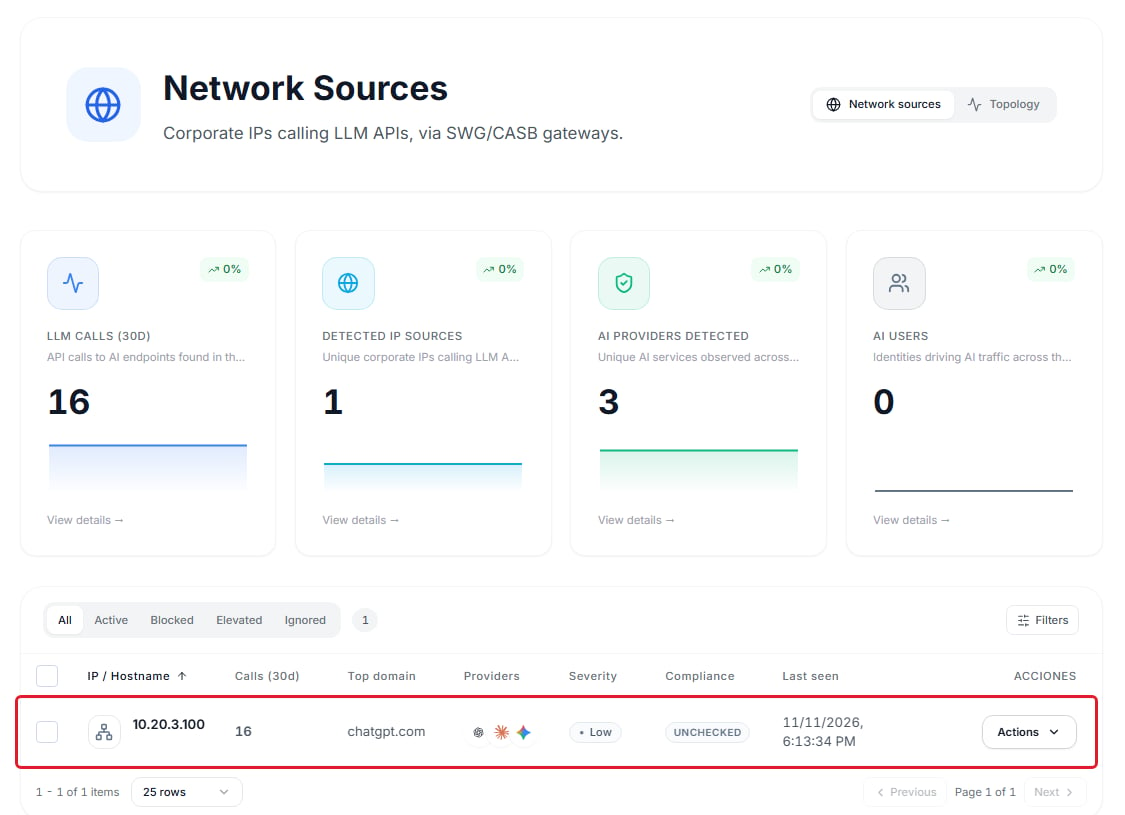
From a LAN device that uses the router as DNS, before prohibiting anything,dig chatgpt.com returns an IP. In
SecureAI, Network Sources shows that device’s IP with OpenAI among its providers:
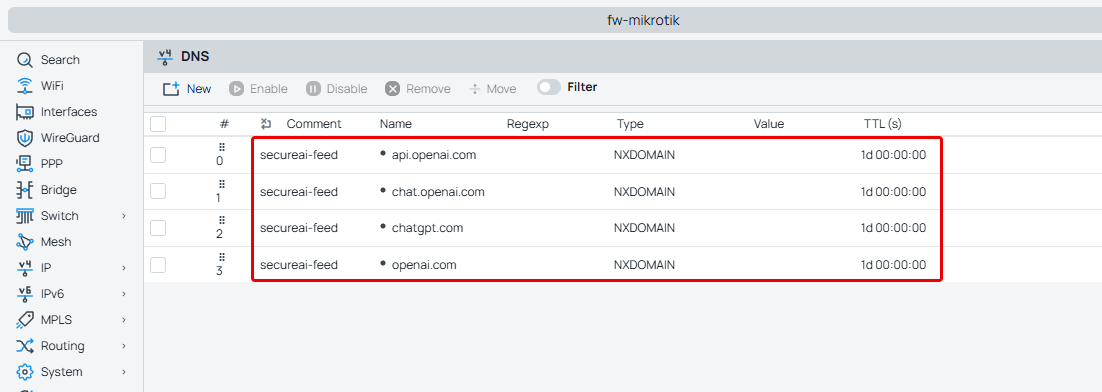
secureai-feed entries, and
the log shows secureai: block list applied, N domains:
Disabling the feed does not unblock
If you disable the feed, delete it or rotate its token, the router gets 403 or 401 and keeps blocking with the last list. To unblock, take the domain out of the policy in SecureAI: on the next run the script removes its entries. To remove the integration from the router, delete the scheduler and the script, then run/ip dns static remove [find comment=secureai-feed] and /ip firewall address-list remove [find comment=secureai-feed].
A block through the feed reaches the whole network behind the router, not a single device.
Why not /ip dns adlist
RouterOS 7.15 ships /ip dns adlist, which reads a domain list from a URL. We do not recommend it: it sends no
credentials (with a user and password in the URL, RouterOS drops them and SecureAI answers 401), it does not block
subdomains, and it writes the full URL to the DNS log.
Limits
- It only sees and blocks devices whose DNS queries go through the router.
- A DoH resolver that is not in the script’s list bypasses the router.
- Catalog patterns with a
*in the middle (bedrock.*.amazonaws.com) cannot be written as DNS entries: the script skips them. - The user and the device come only from the router’s Hotspot and DHCP: a device with a fixed IP, outside those services or on IPv6 shows up without a user.
Versions
RouterOS 7.18 is the first version with the TCP log of step 2 (remote-protocol and remote-log-format), according
to MikroTik’s changelogs. The scripts use /file add with contents (7.15), :onerror (7.13) and match-subdomain
(7.5). On RouterOS 7.15.3 the log configuration fails (unknown parameter remote-log-format).
We tested it end to end on RouterOS 7.25.1 (CHR): discovery over IPv4 and IPv6, user and device from the Hotspot and
DHCP with an IP that goes from one person to another, two routers with the same range on one collector, blocking with
subdomains, the port 53 redirect, DoH blocking by name and by IP, address-list mode, the behavior on 401 and 403, and
a power cut on the router. On November 17, 2026 we also tested it against a SecureAI tenant, from the console:
setup, collector, the panel’s configuration, discovery, block and release (about 4 minutes to the client), new
tokens and disconnect.
On RouterOS 7.18.2 all of that passes except one Hotspot case: when another person takes the same IP right after the
first one releases it, their device does not reach the router during the test. Each person’s identity on its own
arrives fine. TLS validation was tested separately: the router accepts a valid
server and rejects an expired one, one for another name and a self-signed one.